Search Parameters
| |
|
Search Parameters |
Previous Next |
|
The Data Product Search allows the user to enter one or more search criteria in the search dialog. Search fields are described below. Field descriptions can also be reached from the Data Search page by clicking the "details" link next to each instrument.
Instrument
Select an instrument from the drop down menu to restrict data products to a specific instrument, or choose to search for data from all instruments.
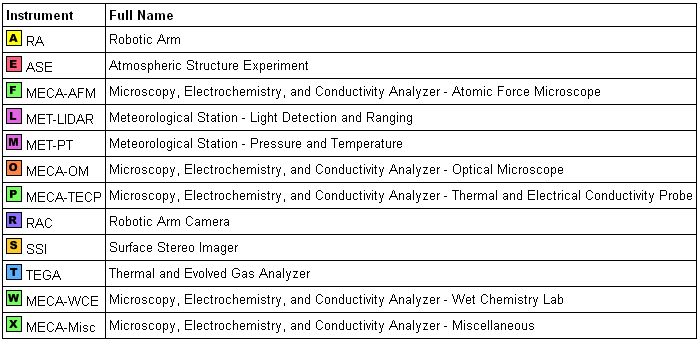
The one-letter instrument abbreviations are defined by the project and used as the first character of the product ID and the product filename.
Ops Token
The Ops Token is an eight-digit hexadecimal number comprised of two parts. The first four digits are the Activity ID as set by PSI. The second four digits are instrument-specific and are assigned by the instrument teams.
Either or both parts of the Ops Token may be specified for the search. Wildcard characters may be used.
Time and Date
Use this option to limit results to products from a given observation time. Time may be specified in one of three ways, as shown below.
Notes
Category and Product Type
Product Category distinguishes between products created by the science teams and products created to support operations.
Product Type is identified by a three-letter abbreviation that is part of the product ID and product filename. The table below shows the product types currently in the Notebook. Wildcard characters may be used in this field. Detailed information about Product Type can be found in the data set documents. View a quick reference list of data product types.
Product ID
Use this option to search for data by Product ID. limit results to products from a given observation time. Time may be specified in one of three ways. Notes
Examples
R*2 Return all version 2 products with ID that starts with "R" (RAC products).
ST026EFF898541927_104AEL4M1 Return the product with the given ID.
Wildcard Characters
Wild card characters may be used in some search fields to represent one or more unspecified characters.
Wild cards are allowed in the Ops Token, Product Type, and Product ID Fields.
|