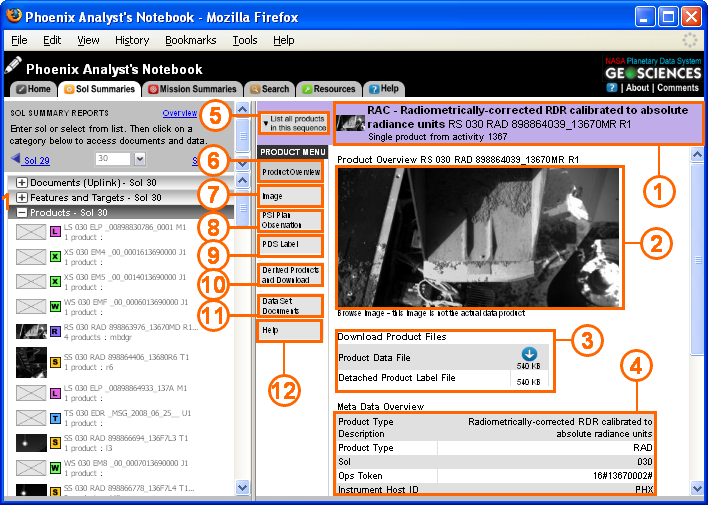
This is the main page for viewing data products. Components of this screen type are described below.
. 
Components of the Detail View
1. Product ID |
The instrument name and product ID are listed here. For more information about product id, read File Naming. |
2. Product Overview |
A quick look at the data products. Includes a browse version for images. |
3. Download |
Download the data product and product label here. For ORT 6, the download view is the same as the Versions view. |
4. Meta Data |
An overview of important meta data is shown here. |
5. List all products |
Click here to list and preview all products in the sequence (only available if product is part of a sequence). Use this menu to select a different product in the sequence, or to reach the Sequence View page. |
6. Product Overview |
Select this link to return to the product overview. |
7. Image |
A full resolution JPEG of the product (for image products). A 1% linear stretch is applied to the image. A slider bar above the image may be used to adjust the zoom of the image.For images in a sequence, the user can create, display, and download a custom RGB or Anaglyph. |
8. PSI Plan Observation |
PSI Plan details for the observation, including name, purpose, start time, uplink priority, and additional notes. |
9. PDS Label |
Displays the PDS Label of the data product. |
10. Derived Products |
Lists raw (EDR) and derived (RDR) versions of the products. Allows the user to open or download the related products. For more information about raw and derived data products, read Data Processing. |
11. Data Set Documents |
Lists all supporting documentation for the data product. Read more about documentation in Data Set Documents. |
12. Help |
Explains the different options available in product view. |
Navigating to Detail View
You can navigate to the detail view page at any time by clicking on the "Sol Summaries" tab, and clicking on a product under the "Products" menu. From any sequence view page, click on an individual product in the "Overview" frame to see the detail view for that product.