|
Some data products were collected as part of a sequence. This is the main page for viewing data product sequences. To view details for a single product, click on that product in the sequence list. The details of sequence view are described below:
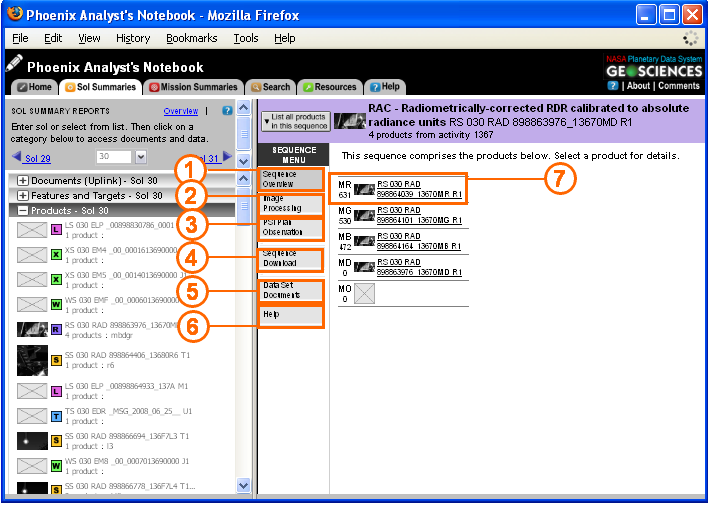
Components of the Sequence View
1. Overview
|
Gives an overview of products in the sequence including Product IDs, sequence details, and product thumbnails, where available. For more information about product id, read File Naming.
|
2. Image Processing
|
For image products, create, display, and download customized RGB and Anaglyph images using sequence images.
|
3. PSI Plan Observation
|
PSI Plan details for the observation, including name, purpose, start time, uplink priority, and additional notes.
|
4. Sequence Download
|
Download the sequence of EDRs as a collection. Select from several available formats including zip file, Unix tar file, Unix gzip (tar.gz) file, ENVI multi-band image file, or ENVI multi-band header.
|
5. Data Set Documents
|
Lists all supporting documentation for the data product. Read more about documentation in Data Set Documents
|
6. Help
|
Explains the different options available in sequence view.
|
7. Product
|
Click on an individual product in the sequence to see the Product Detail View for that product.
|
Navigating to Sequence View
You can navigate to the sequence view at any time by clicking on the "Sol Summaries" tab, and clicking on an icon with multiple products under the "Products" menu. From the detail view, click on "List all products in this sequence" in the upper left corner to see the sequence view for that product.
|
