Map Tools
| |
|
Map Tools |
Previous Next |
|
The map toolbar provides several tools for navigating the map and accessing data in the notebook. This section describes the available map tools.
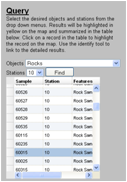
This tool allows the user to search for data products based on product type and station. Read the Query section for more information about using this tool.
This tool changes the map extent to zoom in on selected regions of the map. Read the Zoom In section for more information about using this tool.
This tool changes the map extent to zoom out on selected regions of the map. Read the Zoom Out section for more information about using this tool.
This tool changes the map extent to show the full extent of the map. Read the Full Extent section for more information about using this tool.
This tool identifies surface activities and provides links to the data in the notebook. Read the Identify section for more information about using this tool.
This tool changes the map extent back to the previous extent after zooming in or out. Read the Previous Extent section for more information about using this tool.
This tool returns the map extent selected before selecting the "Previous Extent" button. Read the Next Extent section for more information about using this tool.
This tool allows you to drag the map to change the display window. Read the Pan section for more information about using this tool.
Clicking this button takes you to the Map section of the User's Guide. Read the Map Help section for more information.
Clicking this button displays a pop-up window of the map legend. Read the Map Legend section for more information. |